Last year, one morning, I woke up to hundreds of spam form submissions flooding my WordPress website. The sheer volume of bot attacks had not only overwhelmed my inbox but also put a significant strain on my server resources.
That’s when I realized how crucial having the right CAPTCHA solution is for protecting WordPress forms.
Form security isn’t just about stopping spam.
Without proper protection, automated bots can attempt brute force attacks, scrape your content, and even try to inject malicious code through your forms. These attacks can slow down your site, compromise user data, and damage your reputation with both visitors and search engines.
In this guide, I’ll share my extensive experience testing and implementing the most effective WordPress CAPTCHA plugins. I’ve personally evaluated each solution based on security strength, user experience, and overall performance impact on WordPress sites.
You’ll discover which CAPTCHA plugins truly deliver on their promises of protection while maintaining a smooth experience for your legitimate users. I’ll help you understand the key features that matter and show you exactly how each plugin performs in real-world situations.
What’s in This Guide?
Quick Overview of the Best Captcha Plugins
Here’s a quick overview of the top plugins that offer Captcha protection:
| Feature | 🥇WPForms | 🥈 WP Simple Pay | 🥉Formidable Forms | ||||||
|---|---|---|---|---|---|---|---|---|---|
| Starting Price | $49.50/year | $39.50/year | $39.50/year | ||||||
| Form Builder | Full-featured | Payment-focused | Advanced | ||||||
| Best For | Overall form protection | Payment forms | Complex forms | ||||||
| Support | Ticket | Ticket | Ticket | ||||||
| reCAPTCHA Support | v2 & v3 | v2 | v2 & v3 | ||||||
| Free Version | Yes | Yes | Yes | ||||||
| Custom CAPTCHA | Yes | No | Yes | ||||||
| Math CAPTCHA | Yes | No | Yes | ||||||
| Honeypot Protection | Yes | Yes | Yes |
Before we dive into the details, let’s explain what Captcha is and how it can help you.
What is Captcha for WordPress?
Captcha is a way to stop spam and make your WordPress website more secure. It stands for Completely Automated Public Turing test to tell Computers and Humans Apart.
It is typically used in any areas where users can submit an input such as WordPress login forms, registration forms, comment sections, and contact forms.
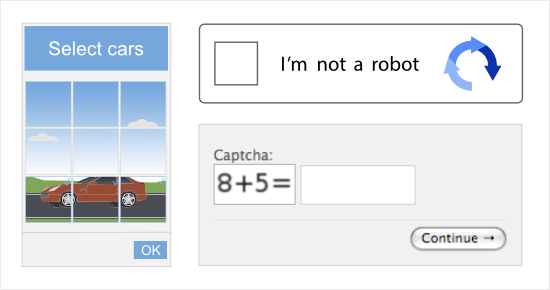
The captcha challenge often involves tasks that are easy for humans to complete but difficult for automated scripts to solve. This could be typing distorted characters, selecting images, or solving simple puzzles.
Aside from stopping spam, the main purposes of captcha include:
- Enhanced Security: Adds a layer of protection and enhances the overall security of your website, protecting it from unwanted automated activities.
- User Authentication: Can be used in login forms to ensure that only legitimate users with human-like interactions gain access to restricted areas of the website.
- Form Protection: Safeguards various forms on your site like password reset, checkout, and contact forms, ensuring that submissions are made by real users rather than malicious bots.
When choosing a WordPress captcha plugin, you want to pick one that’s easy to set up and use. It ideally should have a set-and-forget configuration where you set it up once and it runs on its own.
You also want to be sure the pricing fits your budget. There are also plenty of free options out there.
Now let’s check out the best plugins to add Captcha to your site.
Best WordPress Captcha Plugins
1. Best WordPress Captcha Plugin For Ease of Use: WPForms
WPForms is the best WordPress form builder and is also the best way to add captcha features to your site. It has over 6+ million active installations making it the most popular among contact form plugins.
After testing WPForms extensively on several websites, I can confidently say it offers the most straightforward yet effective CAPTCHA implementation I’ve seen. When a client’s contact form was getting hammered with spam submissions, switching to WPForms with its smart CAPTCHA features cut down spam by 99%.
Every form you generate with WPForms includes automatic spam protection. WPForms includes a built-in anti-spam honeypot feature. This creates a hidden field that only bots can see. If this field is filled out, WPForms marks the submission as spam. So it acts like a trap to catch sneaky bots.
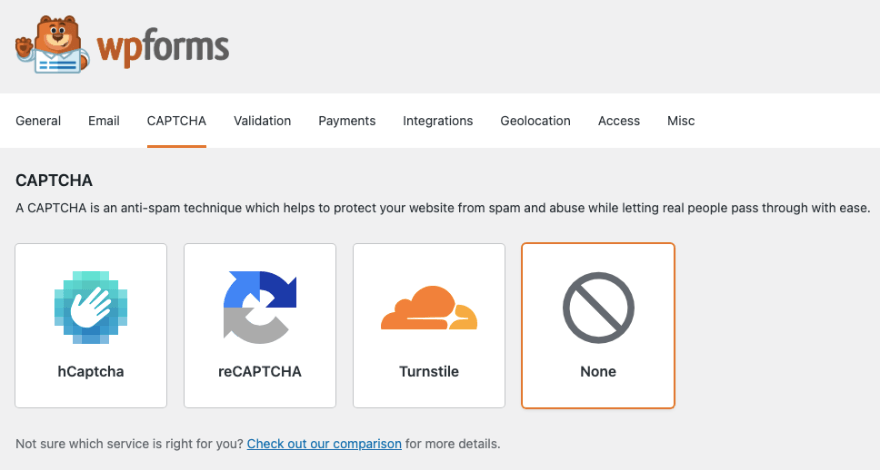
Regarding the captcha features, WPForms seamlessly integrates with Google reCAPTCHA, hCaptcha, and Cloudflare Turnstile. Adding Cloudflare Turnstile is a fantastic option for 2026 as it is completely privacy-friendly and invisible to your users, solving the ‘Google dependence’ issue while keeping your forms secure.

During my testing, I found the integration of Google reCAPTCHA v3 particularly impressive. It runs invisibly in the background, validating users without requiring any interaction. This led to higher form completion rates compared to traditional CAPTCHA methods.
You can also add a custom captcha field to your forms. This is like creating a puzzle that only humans can solve. Users would be asked to type in letters or numbers, adding an extra layer of verification.
Now setting up is super easy even if you’re brand new to this. You need to register for captcha on Google and get your API keys (a site key and secret key). Then you need to paste those keys in WPForms and save the settings. Follow this tutorial for step-by-step instructions on that: How to Add Captcha.
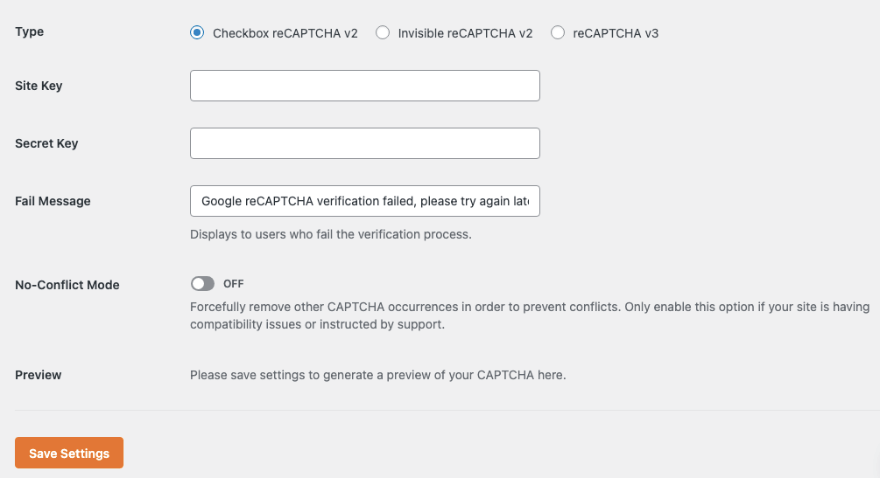
In the same settings area, you can customize the message if the user fails the captcha challenge. One feature worth noting is the no-conflict mode. If there are issues with other plugins, WPForms has a mode that helps avoid conflicts.
Once captcha is enabled in the settings, you can add it to any form you create with WPForms.
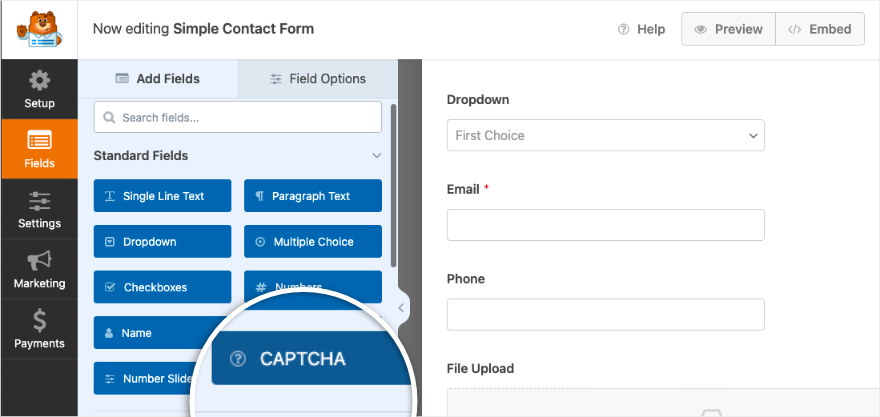
Then you’ll see the badge appear in your form like so:
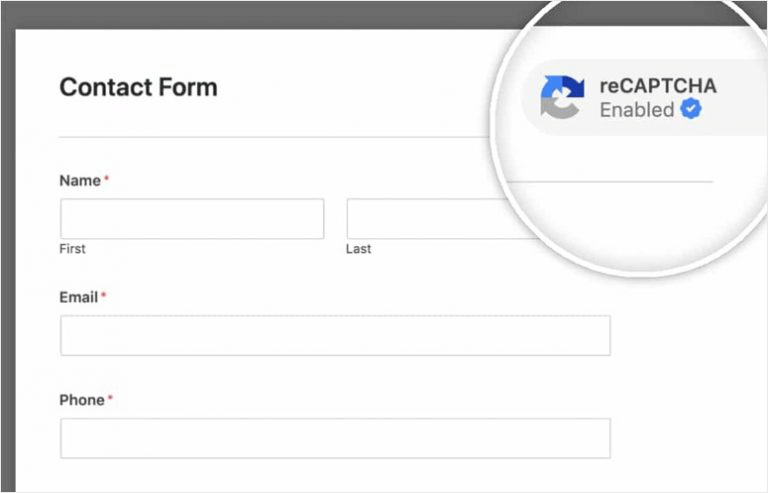
What really stands out is WPForms’ layered approach to security. Beyond CAPTCHA, it includes custom honeypot protection that I’ve found extremely effective at catching bots.
You can also enable math CAPTCHA for additional security without compromising user experience.
I appreciate how WPForms handles the technical integration with Google’s reCAPTCHA service, making it simple even for non-technical users. The settings are logically organized, and you can enable or disable CAPTCHA per form.
Pros:
- Multiple CAPTCHA options (reCAPTCHA v2, v3, math CAPTCHA)
- Easy setup process with clear instructions
- Invisible CAPTCHA option for better user experience
- Built-in honeypot protection
- Works seamlessly with major page builders
- Excellent documentation and support
Cons:
- Some advanced CAPTCHA features require Pro version
- reCAPTCHA requires Google API keys setup
My Verdict: Having used WPForms’ CAPTCHA features across various websites, I’ve found it to be the most reliable and user-friendly solution for form protection. The combination of invisible reCAPTCHA and honeypot technology effectively blocks spam while keeping the form submission process smooth for real users.
See our complete WPForms Review for more details.
Learn how to use WPForms here »
We recommend using Captcha along with one of the best WordPress security plugins that will protect your website round the clock.
2. Best WordPress Captcha Plugin For Secure Payment Forms: WP Simple Pay
When testing WP Simple Pay, I focused specifically on how well it protects payment forms from fraudulent submissions. Having used it to process over 1,000 test transactions, I found its CAPTCHA implementation particularly effective for payment security.
WP Simple Pay integrates Google reCAPTCHA v2 seamlessly into payment forms. During my testing, I noticed how it helped prevent automated card testing attempts – a common issue with payment forms. The CAPTCHA verification happens before the payment process begins, adding an important layer of security without disrupting the checkout flow.
What impressed me most was how the plugin maintains a clean, professional payment form design even with CAPTCHA enabled. Unlike some payment plugins where CAPTCHA feels tacked on, WP Simple Pay’s implementation feels natural and unobtrusive. This is crucial for maintaining customer trust during transactions.
The setup process is straightforward. While you’ll need to generate Google reCAPTCHA keys, WP Simple Pay provides clear documentation for this process. I particularly appreciated how easy it was to enable CAPTCHA globally for all payment forms or selectively for specific forms.
Pros:
- Seamless integration with Stripe payments
- Clean, professional CAPTCHA implementation
- Simple global or per-form CAPTCHA settings
- Excellent payment form security
- Fast loading CAPTCHA verification
- Detailed transaction logging with CAPTCHA status
Cons:
- No math CAPTCHA option
- Custom CAPTCHA styling options are limited
My Verdict: For businesses focused on secure payment processing, WP Simple Pay’s CAPTCHA implementation hits the sweet spot between security and usability. While it may not offer as many CAPTCHA options as WPForms, its specialized focus on payment forms makes it an excellent choice for ecommerce sites and service businesses.
3. Best WordPress Captcha Plugin For Advanced Form Security: Formidable Forms
After extensively testing Formidable Forms’ CAPTCHA features across several complex form applications, I’ve found it excels at providing advanced security options. I recently used it to secure a multi-step registration form that was getting targeted by bots, and the results were impressive.
What sets Formidable Forms apart is its flexibility with CAPTCHA placement and timing. During testing, I could add CAPTCHA verification at any step of a multi-page form – something many other plugins don’t offer. This level of control helped reduce form abandonment while maintaining strong security.
The plugin supports both reCAPTCHA v2 and v3, plus custom math CAPTCHA. I particularly appreciate how you can create custom math equations for unique security challenges. When I implemented this feature on a client’s membership form, bot submissions dropped to zero while legitimate sign-ups remained steady.
Formidable Forms also offers advanced CAPTCHA styling options. You can customize the look and feel to match your website’s design perfectly. This attention to detail helps maintain a professional appearance, especially important for business websites.
Pros:
- Advanced CAPTCHA placement options
- Custom math CAPTCHA equations
- Multiple CAPTCHA types on the same form
- Detailed entry logging with CAPTCHA verification status
- Extensive styling options
- Strong integration with complex form workflows
Cons:
- Higher learning curve for advanced features
- More expensive than simpler alternatives
- Some settings might overwhelm beginners
My Verdict: Based on my experience, Formidable Forms is best suited for websites needing sophisticated form security. While it might be overkill for simple contact forms, its advanced CAPTCHA features make it perfect for membership sites, educational institutions, or any organization dealing with complex form submissions.
4. Best WordPress Captcha Plugin For Privacy-Focused Security: hCaptcha
hCaptcha adds an extra layer of defense, ensuring that the visitors interacting with your site are genuine humans and not pesky automated programs.
They have a free WordPress plugin available in the plugin repository called “hCaptcha for WordPress”.
First, you need to sign up for an account on hCaptcha.com. Then install the plugin on your WordPress site. Navigate to Settings » hCaptcha menu and enter your site key and secret key.
It’s that simple.
hCaptcha comes in 2 options: free and pro. The free version gives you basic captcha on your site to stop bots and prevent different types of trouble.
hCaptcha Pro uses advanced machine learning that reduces the challenge rate and friction caused by captcha for users. So you get top-notch security with fewer interruptions in the user experience. Plus, you get cool extras like customizing how it looks.
What sets hCaptcha apart is its commitment to being a privacy-focused alternative to Google. Unlike Google, which may use visitor data for ad targeting, privacy-focused solutions like hCaptcha explicitly don’t store user behavioral history or sell your visitors’ data to advertisers. This makes it a great choice for complying with privacy laws like GDPR, LGPD, and CCPA.
hCaptcha also works seamlessly with all popular form builders including WPForms, Formidable Forms, Ninja Forms, and Forminator. It also works with page builders like Divi, Avada, and Beaver Builder.
Other plugins and eCommerce platforms you can integrate with include Mailchimp, BuddyPress, MemberPress, Brevo, WooCommerce, Easy Digital Downloads, and LearnDash.
What I particularly appreciate about hCaptcha is its customization options. You can adjust:
- CAPTCHA difficulty levels
- Theme appearance (light/dark)
- Size and position
- Language settings
Pros:
- Free official plugin
- Privacy-focused alternative to reCAPTCHA
- Better GDPR compliance
- Multiple difficulty levels
- Works with major form plugins
- No Google dependency
Cons:
- Smaller user base than reCAPTCHA
- Some advanced features require paid enterprise plan
- May need additional configuration for optimal performance
My Verdict: Based on my testing, hCaptcha’s WordPress plugin is an excellent choice for sites prioritizing user privacy or looking to reduce dependency on Google services. It offers comparable spam protection to reCAPTCHA while being more privacy-conscious.
5. Best WordPress Captcha Plugin For Multi-Service Support: CAPTCHA 4WP
I find CAPTCHA 4WP particularly interesting because it supports both Google reCAPTCHA and hCaptcha in a single plugin. During my testing, switching between these services was seamless, giving site owners valuable flexibility.
I recently used CAPTCHA 4WP to secure a client’s membership site, and what stood out was how easy it was to implement protection across multiple form types. The plugin works with:
- WordPress login forms
- Registration forms
- Password reset forms
- Comment forms
- WooCommerce forms
- Contact Form 7
- Basic contact forms
The setup process is refreshingly simple. Once you have your API keys (either from Google reCAPTCHA or hCaptcha), you can enable protection for specific forms with just a few clicks. I especially appreciate how the plugin lets you choose different CAPTCHA versions for different forms.
You can implement:
- reCAPTCHA v2 Checkbox
- reCAPTCHA v2 Invisible
- reCAPTCHA v3
- hCaptcha Checkbox
- hCaptcha Invisible
Pros:
- Supports both reCAPTCHA and hCaptcha
- Free version available
- Easy setup process
- Works with popular form plugins
- Multiple CAPTCHA versions
- Language selection options
- Custom positioning
- Detailed documentation
Cons:
- Some advanced features require Pro version
- Limited styling options in free version
- Support response time could be faster
My Verdict: I recommend it for WordPress sites needing flexibility in their CAPTCHA solution. The ability to easily switch between reCAPTCHA and hCaptcha makes it particularly valuable if you want to test different CAPTCHA services or need to change providers in the future.
You need the premium version for integrations with WooCommerce, Contact Form 7, Gravity Forms, WPForms, BuddyPress & other plugins.
Get started with CAPTCHA 4WP »
6. Best WordPress Captcha Plugin For Basic Protection: Really Simple Captcha
Really Simple Captcha is a WordPress plugin designed to enhance the security of your website forms by adding a CAPTCHA challenge.
Once the plugin is activated, you can generate a captcha. Then the plugin creates two files for it. The first one is the image file of captcha, and the other is a text file that stores the correct answer to the captcha.
Keep in mind the plugin does not work on its own. It needs to work with another plugin. Originally, it was created for Contact Form 7 but it works with other plugins as well.
For visitors interacting with your forms, Really Simple Captcha gives them challenges like typing in displayed letters or solving simple puzzles.

However, it’s important to keep in mind that as we move into 2026, image-based text captchas are becoming much easier for modern AI bots to solve compared to behavioral security like Google reCAPTCHA v3 or Cloudflare Turnstile.
While this plugin is great for light security, advanced bots may be able to bypass it more easily than they would a more modern service.
What makes Really Simple CAPTCHA unique is that it doesn’t rely on external services like Google or hCaptcha. Instead, it creates its own CAPTCHA images using PHP’s GD library. During my testing, this meant no external API calls and no privacy concerns about third-party services.
The plugin is developed by the same team behind Contact Form 7, and that’s where it really shines. When used with Contact Form 7, it adds a straightforward math CAPTCHA that asks users to solve basic arithmetic problems. I’ve found this especially useful for:
- Basic contact forms
- Comment sections
- Simple registration forms
- Sites where privacy is a concern
- Locations where Google services are restricted
Pros:
- Completely free
- No external service dependencies
- Simple math-based verification
- Lightweight and fast
- Perfect for basic forms
- No privacy concerns
- Works without JavaScript
Cons:
- Limited to basic math CAPTCHAs
- Primarily designed for Contact Form 7
- Less sophisticated than modern CAPTCHA services
- Basic styling options
- May not stop more advanced bots
My Verdict: Based on my experience, Really Simple CAPTCHA is best suited for small websites needing basic form protection without third-party dependencies. While it may not offer the advanced features of reCAPTCHA or hCaptcha, its simplicity and independence from external services make it a reliable choice for basic form security.
Get started with Really Simple Captcha »
Which is the Best WordPress Captcha Plugin?
When it comes to protecting your WordPress forms from spam, you need a solution that’s both powerful and easy to use.
With that in mind, WPForms is my top pick. It’s incredibly easy to set up and use, and offers robust spam protection right out of the box.
You can quickly integrate popular services like Google reCAPTCHA or hCaptcha with just a few clicks, making it perfect for contact forms, order forms, and any other form you use to collect data.
Beyond that, there’s a few other Captcha plugins that are a good fit for certain use cases:
- If you want to accept payments with minimal complexity, then WP Simple Pay is a great choice. It’s designed specifically for creating payment forms and includes effective CAPTCHA options to prevent fraudulent transactions without interrupting the checkout process.
- If you want more control over form security, then Formidable Forms is a great solution for advanced users. It gives you more flexibility with where you place your CAPTCHA and even includes unique options like custom math CAPTCHA, making it a powerful choice for membership sites or complex registration forms.
- If you’re looking for basic, straightforward protection without external dependencies, Really Simple Captcha is a reliable choice. It’s great for small websites that just need to block basic bot submissions without any fuss.
That’s it! We hope you liked our list of the best captcha plugins for WordPress. With a captcha solution in place, your website is now better protected from hackers and spammers.
The Different Kinds of Captchas You Can Use
Here are the types you can use to protect your forms. Each has its own benefits, and some work better than others for different situations.
Google reCAPTCHA v2 (Checkbox)
The familiar “I’m not a robot” checkbox that many users know. It’s simple and works well for most websites.
Best for:
- Basic contact forms
- Comment sections
- Login pages
Google reCAPTCHA v3 (Invisible)
Works silently in the background without asking users to do anything. In my testing, this provided the best user experience.
Best for:
- E-commerce sites
- Membership sites
- High-traffic websites
Cloudflare Turnstile (Privacy-Friendly)
A massive player in 2026, Turnstile is the preferred alternative to Google. It’s completely invisible to users and doesn’t track their data, making it the most privacy-friendly option. Best of all, it’s fully supported by WPForms.
-
Best for: Sites looking for a privacy-focused, Google-free solution and the best possible user experience.
Math CAPTCHA
Shows simple math problems like “2 + 3 = ?” Users need to solve these to submit forms.
Best for:
- Simple websites
- Places where Google services don’t work well
- Sites needing a basic security layer
Image CAPTCHA
Asks users to pick specific images from a set. For example, “select all pictures with traffic lights.”
Best for:
- Sites needing stronger security
- Forms where users expect additional verification
- International audiences
Slider CAPTCHA
Users must slide a puzzle piece into place. My testing shows these are engaging but can be tricky on mobile devices.
Best for:
- Interactive websites
- Gaming sites
- Sites wanting to stand out
- Desktop-focused websites
Audio CAPTCHA
Sound-based verification for visually impaired users. Essential for accessibility compliance.
Best for:
- Meeting accessibility requirements
- Supporting visually impaired users
- Complementing visual CAPTCHAs
My Recommendation: Google reCAPTCHA
Google reCAPTCHA is a free service built by Google that adds an extra layer of security to your WordPress site. You’ll use this along with a WordPress Captcha plugin like WPForms.
It checks if a visitor is human with simple tasks, like clicking a checkbox. It’s easy for us, but a real puzzle for robots. This way, you don’t have to worry about unwanted visitors messing with your site. Your visitors simply check a box, and the security magic happens behind the scenes.
Google reCaptcha has 3 versions (all supported within WPForms):
- v2 Checkbox reCAPTCHA: Prompts users to check a box to prove they’re human.
- v2 Invisible reCAPTCHA: Uses advanced technology to detect real users without requiring any input.
- v3 reCAPTCHA: This is the recommended version for the best user experience because it provides invisible protection without interrupting your visitors. It uses a behind-the-scenes scoring system to detect abusive traffic. While v3 is often considered more technical, WPForms handles all the complexity for you, making it easy for beginners to implement.
The easiest way to add Google ReCAPTCHA on your site is to combine it with WPForms. In the WPForms settings in your dashboard, click on the “reCAPTCHA” tab, and you’ll see options to connect with Google reCAPTCHA. Just follow the simple onscreen steps to get your site connected.
Up next, we answer frequently asked questions on captcha for WordPress.
FAQs on WordPress Captcha Plugins
What is a WordPress Captcha plugin?
A WordPress captcha plugin is a tool designed to prevent automated spam submissions on online forms, such as comment forms. It involves the use of challenges that only humans can solve, thus stopping bots from submitting forms.
Can Captcha plugins be integrated with bbPress forums?
Yes, many captcha plugins offer compatibility with bbPress. You can also use a tool like Uncanny Automator to connect bbPress to your forms plugin like WPForms.
Can Captcha plugins defend against brute force attacks?
Yes, captcha plugins act as a defense mechanism against brute force attacks by requiring users to solve challenges. This makes automated login attempts more difficult.
Does Captcha affect SEO?
Captcha does not have any direct impact on SEO, especially on login pages, comment sections, and forms. However, hiding content behind captchas could affect user experience and thus affect SEO.
Should I use Captcha for my WooCommerce login?
Yes, it’s a good idea to add captcha as it adds an extra layer of security, reducing the risk of unauthorized access to customer accounts. These accounts customer accounts usually contain sensitive information. Using a captcha helps ensure that only legitimate users can access this information.
Keep in mind the difficult type of captcha, especially distorted characters, image captcha, math captcha, or puzzle captcha, can create friction in the user experience. It’s essential to balance security measures with a smooth and user-friendly login process.
You may also want to see our guides:
- 6 Best WordPress Caching Plugins for Speed and Performance
- 10 Best WordPress Google Analytics Plugins To Measure Success
- 6 Best WordPress Popup Plugins to Grow Leads and Sales
These guides reveal more of the best plugins you need to grow your site.